
CodeCaster
A vibe-coded, AI-driven data analysis platform that lets social-science researchers upload a dataset, ask questions in plain English, and get Python or R scripts generated, validated, and executed in a Dockerized sandbox without writing code.
Social science students and researchers frequently encounter a significant barrier to entry when conducting quantitative analysis: the steep learning curve of programming languages like Python and R. CodeCaster is a web-based, AI-driven data analysis platform that abstracts away the coding process. Users upload datasets and use natural language to request analytical workflows, acting as project managers. The platform leverages a multi-model Gemini architecture to generate, validate, and securely execute Python or R scripts in a local Dockerized sandbox, returning statistical interpretations and visualizations.
The brief.
A traditional social science workflow involves receiving a massive data set or collecting data, then being tasked with finding underlying correlations. Traditionally, a student must manually scrub the data for errors, decide how to handle missing variables, and scour documentation to find the exact syntax for a regression model in Pandas or R. This process can be cumbersome. At best, it wastes time; at worst, it is offputting to those with great analytical skills but who struggle with technology.
Large Language Models exist to help write code, but they require prompt-engineering savviness, and passing raw, dense CSV data back and forth into a generalized chatbot is an arduous, error-prone process that lacks context awareness. CodeCaster addresses that gap by building a dedicated interactive sandbox where users of any technical background can securely upload datasets and use natural language to direct a specialized AI agent — generating the exact script needed, executing it locally, and interpreting the results in one place.
Target: College students, academic researchers, and industry analysts within the social sciences who need to run summary statistics, data filtering, and complex multivariate regressions but view programming as a barrier rather than a primary skillset.
The most valuable lesson learned is that AI is a phenomenal executor but a poor architect.From the write-up
The landscape.
| Tool | Approach | Weakness | Our edge |
|---|---|---|---|
| SPSS / Stata | Commercial statistical software with GUIs | Steep learning curve and expensive licensing fees | Free, browser-based, and driven entirely by natural language |
| ChatGPT / Claude (generalized) | General-purpose LLM chat for code drafting | No dedicated execution environment; user must copy code out, paste data in, and reconcile context manually | Owns the full pipeline — ingests the data, writes the code, executes it in a sandbox, and interprets the output in one UI |
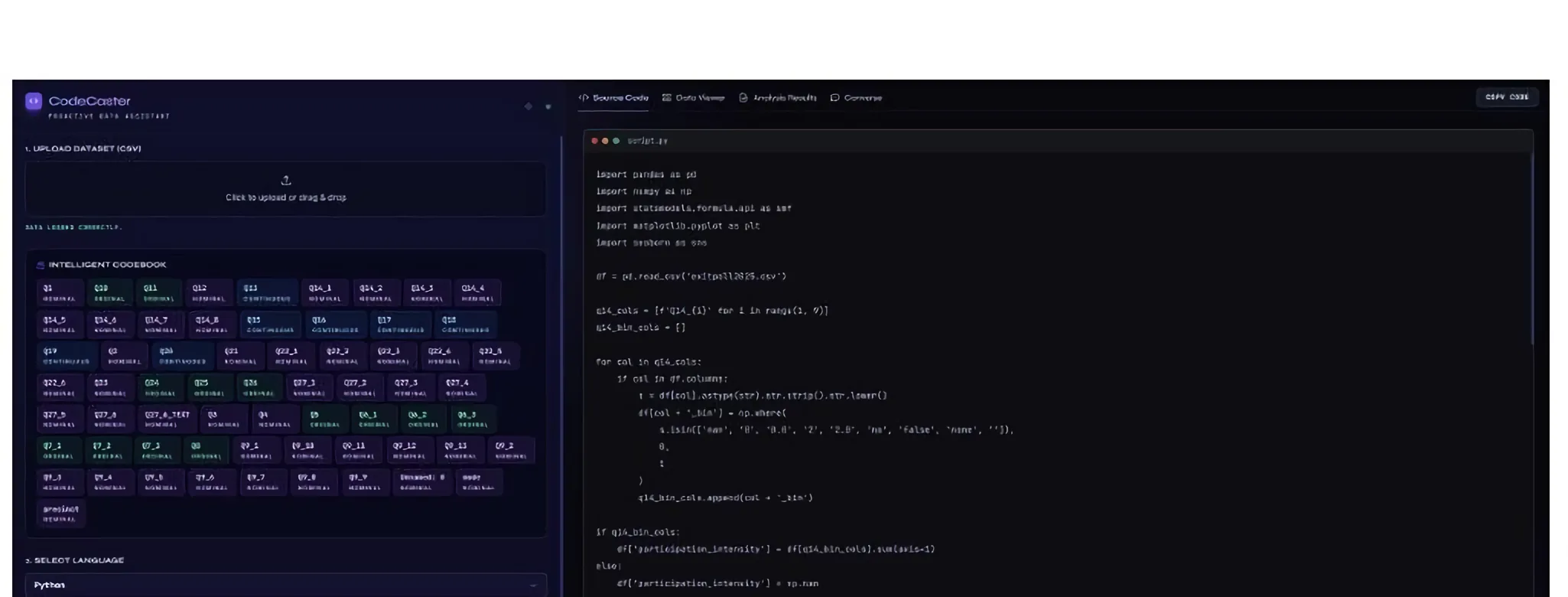
CodeCaster differentiates itself by owning the entire pipeline: it ingests the data context, writes the code, executes it in a secure container, and interprets the output in a single, unified interface. The Intelligent Codebook classifies every variable as Nominal, Ordinal, or Continuous and secretly injects that classification into all future code-generation prompts, acting as a critical guardrail so the AI does not run a continuous model like OLS regression on nominal data.
The system.
CodeCaster is a single-page web application featuring a glassmorphism-inspired UI built with Tailwind CSS. It replaces the traditional split-screen proposal with an organized, multi-tabbed dashboard to prevent UI clutter. The user begins in the left-hand configuration panel. Upon uploading a CSV dataset, the platform immediately triggers the Intelligent Codebook feature: CodeCaster reads a sample of the data and uses AI to classify every variable as Nominal, Ordinal, or Continuous. This codebook is visually presented to the user and is secretly injected into all future code-generation prompts. This acts as a critical guardrail, ensuring the AI does not attempt to run a continuous model like OLS regression on nominal data, preserving statistical validity.
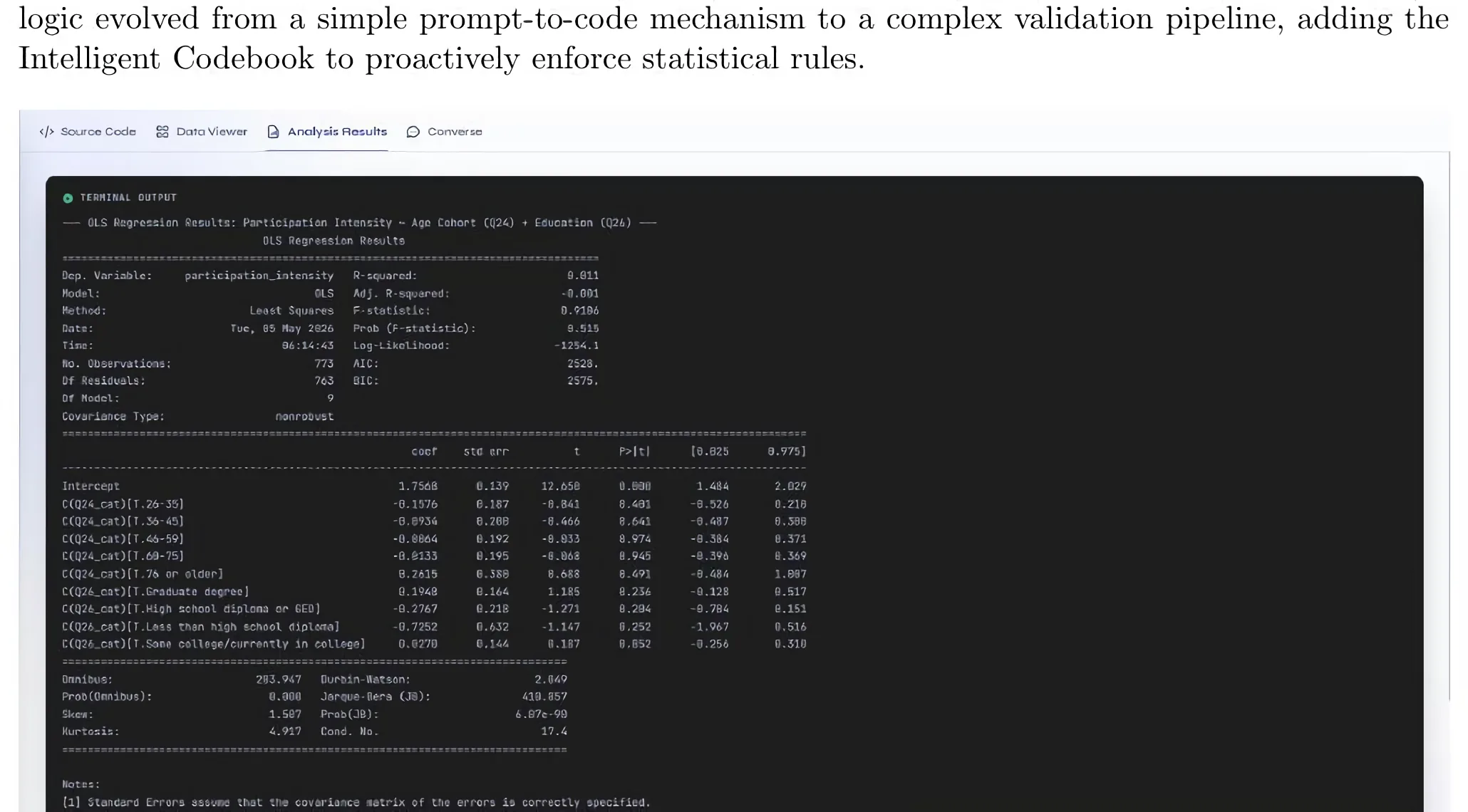
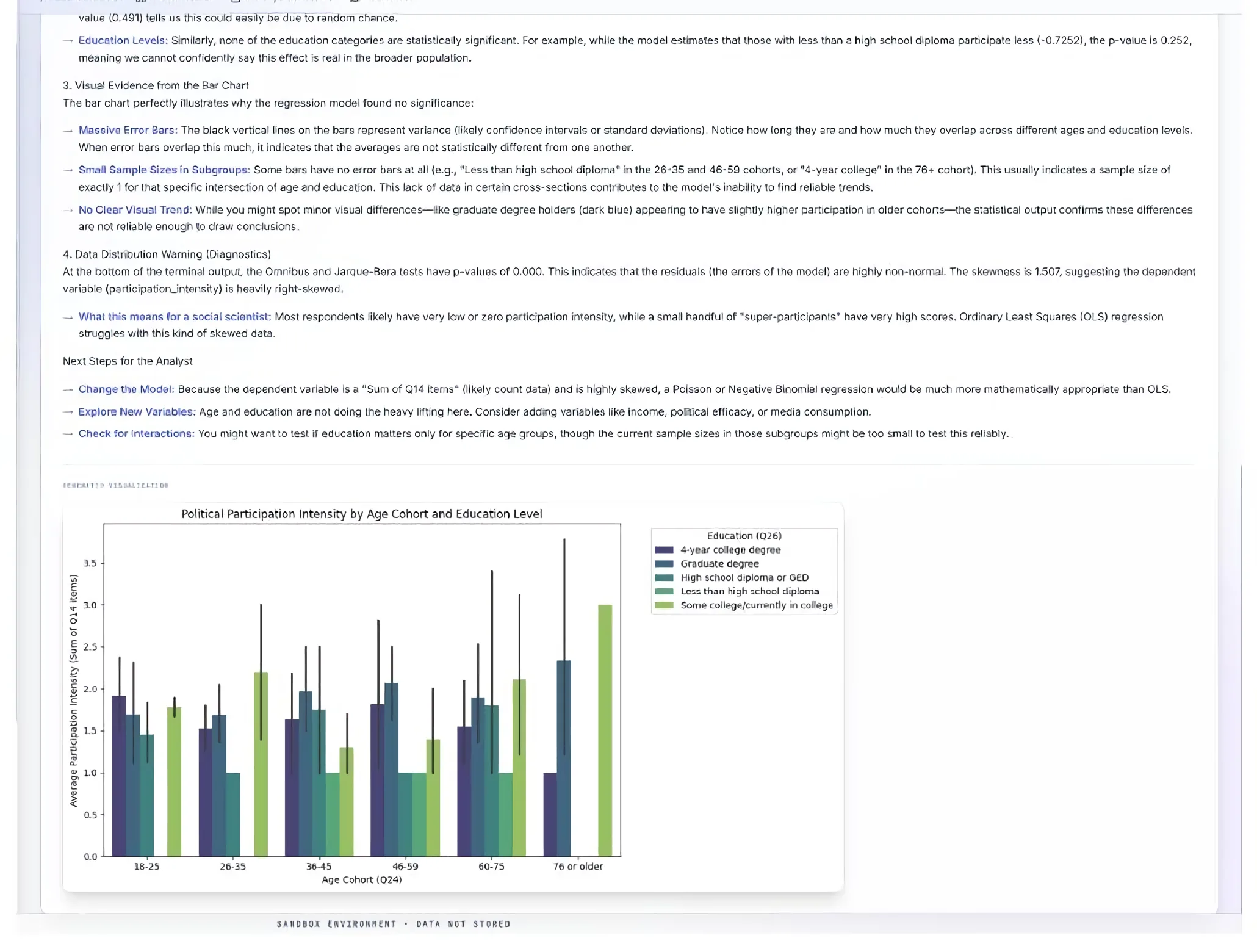
Users select their preferred language (Python or R) and enter a plain-English prompt. The right-hand panel features four distinct tabs: Source Code (the optimized, commented script generated by the AI), Data Viewer (a paginated, searchable data table for live inspection), Analysis Results (raw terminal output of the executed script, generated plots, and a plain-English AI interpretation of p-values and correlations), and Converse (a contextual chat interface allowing follow-up questions about the specific results).
The application architecture relies on a robust separation of concerns: Vanilla JavaScript for the frontend and Python/Flask for the backend, entirely containerized via Docker.
The implementation.
Security and environment consistency were paramount. The backend is a Flask server (app.py) that handles file uploads (capped at 16MB) and API routing. Because the platform executes AI-generated code, running this natively on a host machine poses security risks. Therefore, the entire application is bundled in a Docker container (Dockerfile and docker-compose.yml) using a python:3.10-slim base image, pre-loaded with necessary Python libraries (Pandas, Statsmodels) and R dependencies (dplyr, ggplot2). Code execution is sandboxed using Python's subprocess.run with strict timeout parameters.
CodeCaster does not rely on a single LLM call; it utilizes a multi-agent pipeline via the Google GenAI SDK to balance speed, cost, and reasoning capability. Gemini 3.1 Pro Preview handles the heavy lifting — drafting complex Python/R scripts based on the Codebook and performing deep multimodal interpretation of the final terminal output and plots. Gemini 3 Flash Preview acts as a rigorous validation layer, a 'senior code reviewer' checking the drafted code for syntax errors and missing imports before it is presented to the user, and as a rapid formatting engine to clean up Markdown text. Gemini 3.1 Flash Lite Preview handles safety moderation (blocking malicious or off-topic prompts instantly) and powers the conversational follow-up tab, ensuring rapid response times for chat.
The final product aligned closely with the mid-semester proposal, with two notable improvements: the proposed split-screen UI was upgraded to a tabbed interface to accommodate the breadth of features without overwhelming the user, and the backend evolved from a simple prompt-to-code mechanism to a complex validation pipeline anchored by the Intelligent Codebook.
Built with AI.
Where AI helped
- Scaffolding boilerplate code and handling CSS styling — animated background blobs, glassmorphism panels, and responsive Tailwind flexbox layouts took minutes instead of hours.
- Early-stage architecture when there was not much code to work with — the AI created a working foundation quickly.
Where AI struggled
- Code Extraction Regex — the AI initially struggled to write a robust regex to extract raw code from the LLM's Markdown fences; several manual iterations were needed to handle conversational text mixed with code.
- Subprocess Context — when implementing local code execution via subprocess.run, the AI failed to account for the directory context of generated plots; saved plot.png files landed in the container's root rather than the designated upload folder. Required human debugging and explicit pathway mapping.
- Vanilla JS DOM Manipulation — keeping the DOM in sync across four tabs (code block, loading spinner, chat history) produced race conditions the AI could not logically trace without extensive human guidance.
AI is a phenomenal executor but a poor architect. Open-ended prompts like 'build a data analysis platform' result in messy, disjointed codebases, while highly scoped prompts like 'write a Flask route that accepts a base64 image and a text string and feeds it to Gemini 3.1 Pro for multimodal interpretation' yield production-ready code. An AI's ability is only as good as the user's ability to direct and manage it — and being familiar with your codebase remains crucial despite these new tools.
The evidence.
Limits & next.
Limits
- The 16MB file upload limit imposed by Flask restricts analysis of massive, enterprise-level datasets.
- While Docker provides isolation, using subprocess.run to execute AI-generated code still carries inherent security risks if deployed to a public, internet-facing server without further hypervisor-level sandboxing.
- The quality of generated statistical scripts is entirely bounded by the Gemini model; highly obscure R packages may occasionally result in hallucinations.
Next
- Proactive Analytics & Expanded Formats — automated statistical tests suggested the moment a dataset is uploaded, plus support for non-CSV formats and PDF codebook ingestion.
- Advanced Data Wrangling — interactive UI tools to filter, recode, and drop columns with an undo/redo version history sidebar.
- Automated Reporting & Export — narrative-driven, style-tailored data reports, with full workspace export (data, scripts, plots, report) as a zipped project.
- User Authentication & Session State — persistent chat histories, password-protected workspaces, and infrastructure scaling for concurrent users.